Frequently Asked Questions
Yes, the change-marked technical specifications are available in the Technical Specification Portal.
Change your B2B schema
Prerequisites
To update your B2B aseXML schema, all received messages must be cleared from your outbox.
For a new B2B aseXML schema release, you can change it as soon as you receive the implementation complete notice from AEMO.
You have 30 minutes to complete a B2B aseXML schema change.
- Ensure your participant system is ready to receive files conforming to your chosen schema version.
- Ensure the following are empty:
- B2B Outbox
- B2B Inbox
- B2B Hub Queue
Your B2BBusiness-to-Business. Generic term used to refer to defined business-to-business interactions between participants; excludes interactions between a participant and market systems such as MSATS. Outbox, Inbox, and Hub Queue must be clear of received B2B message otherwise the Complete change button is inactive.

Changing your B2B schema version
To nominate a new B2B aseXML schemaSpecification to describe the structure of an aseXML message. version for one or more transaction and acknowledgement types:
- Access B2B transforms and protocols.
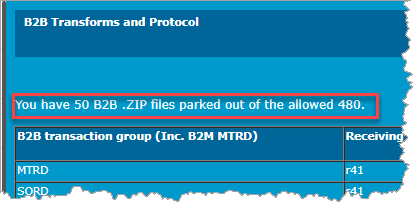
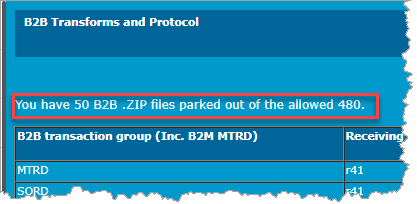 Check for ZIP files and ACKS. The amount of ZIP files displays under the title in the B2B Transforms and Protocols interface. If they exist:
- In the B2B Browser > B2B Outbox, action and acknowledge all outstanding messages.
- In the B2B Browser > B2B Inbox, action and acknowledge all outstanding messages.
- In the B2B Browser > B2B Hub Queue, action and acknowledge all outstanding messages.
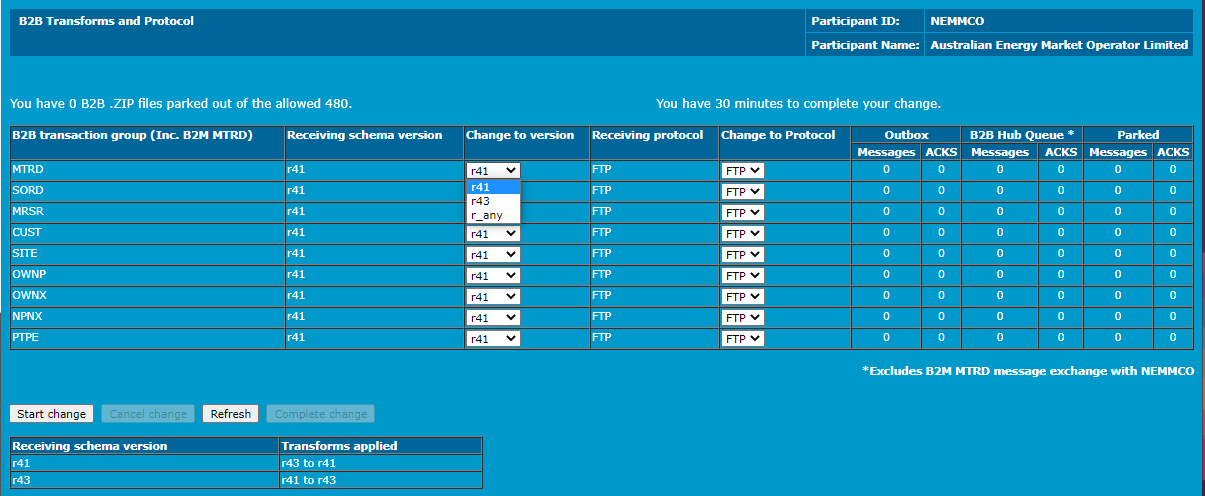
- In the B2B Transforms and Protocols interface, click Refresh to check if the ZIP files are clear. Continue clicking Refresh until the file count is zero (0) for all files and ACKS.
- Click the drop-down arrows under Change to version and select the schema release you are going to handle for each required B2B transaction group. r_any means you can receive in any available Receiving schema version.
- Click Start change.
- To abandon, click Cancel change. Abandoning the change is only possible if you have not already completed the change. If Cancel change is not activated, then you have either, already completed the change, or the change is cancelled.
- Click Complete change when it activates.
Check for a B2B stopfile
To check for the presence of a B2BBusiness-to-Business. Generic term used to refer to defined business-to-business interactions between participants; excludes interactions between a participant and market systems such as MSATS.stopfileWhen the number of unacknowledged outbound files in your Participant Outbox exceeds the upper or lower limit, a Stopfile is imposed on your Participant Outbox Transactions. Once imposed no more processing on inbound or outbound Transactions occurs until the file numbers fall below the Lower Limit. in your B2B Outbox:
Unless you have placed the stopfile yourself, a stopped status indicates you are stopped from participating in the market. You cannot make any changes to your protocol preference or receiving schema until you clear the stopfile. For more details, see Technical Guide to MSATS.
- Access B2B transforms and protocols.
- If a stopfile is present the message below displays asking you to acknowledge the B2B zip files in your outbox. It must be empty for the transition to complete.
- If a stopfile is present, clear the outbox.
- Click Refresh to check if the stopfile is cleared. If yes, the B2B Transforms and Protocols interface displays.
B2B transforms only occur between the current and superseded versions. For example, if the current B2B schema is r41 and you are on the superseded B2B schema r38 then transforms are available. If you are on a non-supported version of the B2B schema then no transforms are available and the transaction is delivered in the version it was sent.
AEMOAustralian Energy Market Operator applies an XMLeXtensible Mark-up Language. transform to change the schema release of user-selected transaction types, including their acknowledgements. Only the transaction types supported in both the currently supported and immediately superseded schema releases are available for selection, since any transaction type available in only one release of an aseXML schemaSpecification to describe the structure of an aseXML message. is limited to that release.
For help applying schema transforms, see Nominate B2B Transforms.
Versioning of the transaction types and the aseXMLA standard for energy transactions in XML. A set of schemas and usage guidelines that define how data should be exchanged under FRC in the gas and electricity industries in Australia. schema are different, although related. Each aseXML release has an unique identifier, being its namespace identifier (for example, xmlns=”urn:aseXML:r25”). The part after the second colon in the namespace identifier is used as an abbreviation of the aseXML schema namespace identifier, since that is the part that changes from one release of aseXML schema to the next. By convention, transaction types use the abbreviation of the aseXML schema identifier when the transaction type definition last changed as the version identifier of that transaction type. This means the two identifiers are related, look the same, and both can be called a “version”. So, the meaning of the abbreviation (such as “r25”) depends upon its context, and it is possible to easily misinterpret the context due to the relationship. Similarly, the word “version” may refer to the transaction type version attribute or to the aseXML namespace identifier abbreviation, depending upon context. Processing XML files (including transforming) requires clear handling of the namespace, so the B2B Transforms menu has the aseXML schema releases as its primary context, and the transaction types are used to partition the transitioning process (if desired).
The ability to transition one B2BBusiness-to-Business. Generic term used to refer to defined business-to-business interactions between participants; excludes interactions between a participant and market systems such as MSATS. transaction group at a time allows progressive implementation of the changeover from one aseXML schema release to the next supported release in B2B.
Making the transition from receiving in one release of aseXML to another requires reducing activity to zero, to achieve a clean changeover. Doing nothing for an extended time hampers the flow of B2B business between participants, so a time-limit is imposed for the transition. To prevent an excessive backlog of files to catch up, a maximum is set for the count of .zip files held back from processing during the transition before the changeover is either completed or cancelled.
During the transition time, a temporary holding folder in each participant’s B2B folder, called “parkbox”, holds the files sent by other participants. When the transition between aseXML releases completes, the files in the holding folder are copied or transformed into the outbox and deleted after processing.
What happens during a B2M schema implementation
|
Participant status |
AEMO action |
Participant action prior to implementation |
Participant receiving version after implementation |
|---|---|---|---|
|
LATEST |
Moves you to the new schema version Sends you messages in the new schema version |
Transition to the new version |
CURRENT and SUPERSEDED The LATEST status is always compliant |
|
CURRENT |
Moves you to SUPERSEDED Sends you messages in SUPERSEDED |
Choose when to transition to CURRENT |
SUPERSEDED |
|
SUPERSEDED |
Moves you to the new SUPERSEDED version Sends you messages in SUPERSEDED No longer supports the previous SUPERSEDED version |
Transition to the new SUPERSEDED version Choose when to transition to CURRENT |
SUPERSEDED |
Subject to an authorised request, data sharing is handled using AEMOAustralian Energy Market Operator's Data Interchange (DI)Data Interchange software. A data sharing requirement may emerge, for example, due to a merger with, takeover of, or sale of another participant ID. For details, see Data Sharing in the Data Interchange Online Help.
MSUGMarket Systems User Group is open to all interested participants. To get an invite, ask your company’s support team to include your email address in their AEMOAustralian Energy Market Operator Help Desk Bulletin (CRM). For help, see Last modified: 03 June 2025
AEMOAustralian Energy Market Operator notifies Participants when new versions of the tech specs are published via a Support Hub Bulletin. Also, on the upper right of the tech spec portal page, the Last modified field indicates when it was last updated.
Please send suggestions for updates and improvements to technical specifications and the MSUGMarket Systems User Group meeting to techwriters@aemo.com.au or email the Support Hub with resolver group: EAS Knowledge Management.
AEMOAustralian Energy Market Operator are conscious of the significant change for participants and are considering options.
Currently, we have no formal plans, but if participants are interested and see the value, we'd appreciate Feedback so we can consider it as a future service.
No, but there are two approaches AEMOAustralian Energy Market Operator can consider:
-
Set the PERIODITTO field equal to the PERIODID field for all the historical data ensuring participants have a consistent representation, although this is inefficient storage.
-
A more comprehensive approach is collapsing the historic data into a sparse model to realise the storage benefits.
Please provide Feedback.
Participant suggestion: We can add that column to the database so the loader can automatically populate and verify by the start and end dates that we have 288 records for a bid. AEMOAustralian Energy Market Operator think this suggestion has merit and have implemented it.
AEMOAustralian Energy Market Operator are conscious of the significant change for participants and have implemented a _SPARSE file.
We looked at it but decided no because the data in those tables is a composite offer across an entire market day, representing the 5-minute quantities for a particular DUIDDispatchable Unit Identifier and service so it doesn’t suffer from the same data volume problems.
MSUG Meetings
The Market Systems User Group (MSUGMarket Systems User Group) is an industry user group established to discuss wholesale and retail IT systems releases. Its purpose is to facilitate the continuing improvement of AEMOAustralian Energy Market Operator's IT systems by seeking feedback and collaboration from participants.
r_any is not a schema version. Selecting this status means you receive files in the version they were sent with no transformation.
AEMOAustralian Energy Market Operator can gauge participant interest and see if it there is value as a future change.
A technical specification provides requirements and information for energy operations affecting participants as a result of a rule change or a project. It also communicates the release timeline and design.
During the project lifecycle, the technical specification is the source of truth until the information is published in the corresponding online help for the pre-production release.
An initial draft is created based on the requirements and new iterations are published (every month or as required) based on the design stages. As the project goes through development and testing, the tech spec is updated to provide latest updates to the participant until the preproduction release.
The in-progress section contains technical specifications for in-flight projects. When a project goes into pre-production and its status changes to Final, it moves to the respective section as a reference document.
Related guides are published for the pre-production release date when they become the source of truth. Until then the technical specification is the source of truth. If a guide is published earlier the date and link are in the technical specifiation.
If they are published earlier we advise in the related documents section in the technical specification.
Technical specifictions are published monthly, if required. You can check the timeline in the technical specification document for the next tentative date of publish.
All technical specifications become final after the production date. The status section of the technical specifications explains if we expect many more changes or if the design is close to final.
Go to AEMOAustralian Energy Market Operator's IT change and release management page.