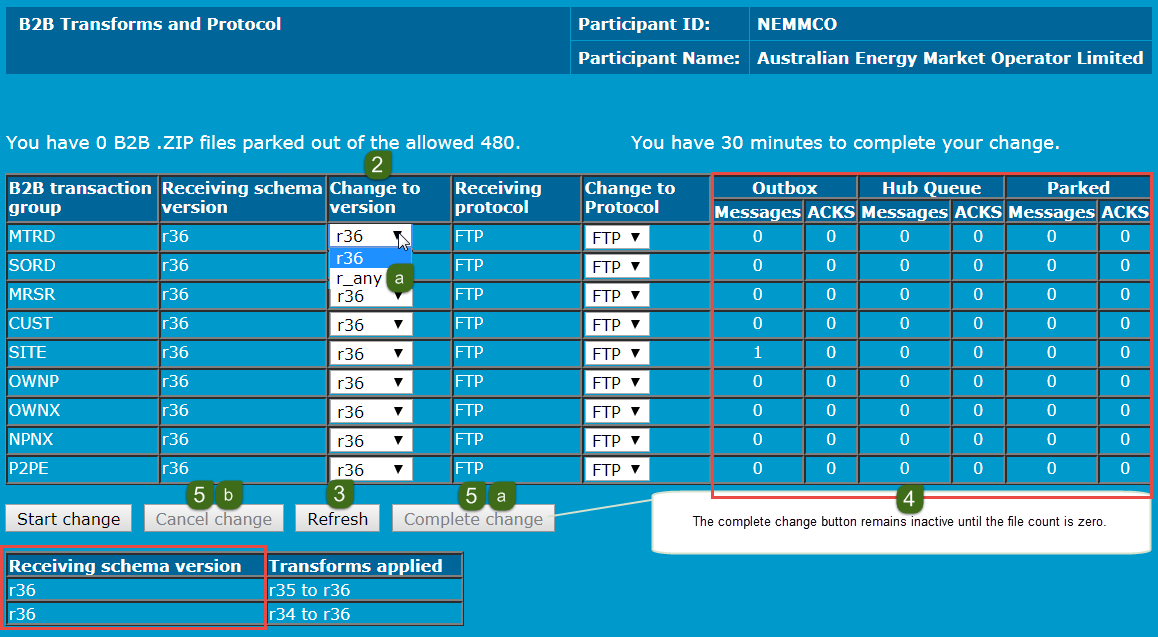
Nominate B2B transforms
Only the transaction types supported in both the currently supported and immediately superseded schema releases are available for selection.
Prerequisites
- Ensure your participant system is ready to receive files conforming to your chosen schema version.
- Ensure your participant B2B outbox is empty of files.
- Ensure your participant B2B inbox is empty of files.
Participants have 30 minutes to complete a B2B Transforms change.
To nominate a new B2B Business-to-Business. Generic term used to refer to defined business-to-business interactions between participants; excludes interactions between a participant and market systems such as MSATS. transform for one or more B2B transaction types (for both the transaction and its acknowledgement):
- Access B2B transforms and protocols. For help, see page 1.
- Click the drop-down arrows under Change to version and select the schema release you are going to handle for each required B2B transaction group. For help, see .
- r_any means you can receive in any available Receiving schema version.
- Click Refresh to check if you are stopped for B2B file input and if not click Start change.
- Continue clicking Refresh until the file count is zero (0) for all files.
- When the total file count is zero, Complete change activates, do one of the following:
- To complete the transform, click Complete change.
- To abandon the transform, click Cancel change. Abandoning the change is only possible if you have not already completed the change. If Cancel change is not activated (that is, is greyed out) then you have either, already completed the change, or the change is cancelled.
r_any is not a schema version. It means you receive files in the version they were sent with no transformation.