Requesting an MDMT report
To request an MDMT report, the participant's system must generate a request that conforms to the applicable aseXML A standard for energy transactions in XML. A set of schemas and usage guidelines that define how data should be exchanged under FRC in the gas and electricity industries in Australia. Schema See aseXML Schema..
Participants zip the aseXML document and upload it into MDM Meter Data Management system includes the Profile Preparation Service, Basic Meter Profiling, and Data Aggregation. using the MSATS Market Settlement and Transfer Solutions. The procedures published by AEMO under clause 7.2.8 of the National Electricity Rules, which include those governing the recording of financial responsibility for energy flows at a connection point, the transfer of that responsibility between market participants, and the recording of energy flows at a connection point. Browser interface. Place the file into your Participant Inbox on the Participant File Server The publishing point from AEMO systems to participant systems. Each participant is allocated an account and access to private and public areas. Participants are responsible for interfacing with the participant file server. or send it as an aseXML Payload The content in the csv file. For example: For APIs, it is the data sent by a POST request that sits after the API header. For MSATS transactions, it is the data wrapped in the standard aseXML wrapper. For NEM reports it is the csv payload compressed in a zip file. using AEMO Australian Energy Market Operator’s Market facing e-Hub Consists of the API Portal and the API Gateway for both electricity and gas. APIs.
Participants request reports using the following methods:
- An MDMT Report Request transaction from the MSATS Web Portal > Reports and Alerts > MDM menu. For help, see Guide to MSATS Web Portal. The report request is for either:
- Immediate compilation and delivery.
- Scheduled to run as a one-off with an option to specify a run date and time.
- Using FTP to the Participant File Server. Participants place the MDMT report message directly into their Participant Directory Inbox. The report request is for immediate compilation and delivery.
- Using an API to AEMO’s e-Hub. Participants place the MDMT report messages using the B2M e-Hub Asynchronous Push-Push or Push-Pull APIs. For help, see Guide to B2M Retail APIs. The report request is for immediate compilation and delivery.
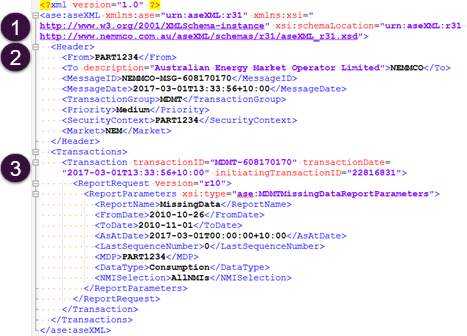
The aseXML document has the following three sections.
1 Schema information
See Example RM11 Missing Data report
Details the aseXML schema Specification to describe the structure of an aseXML message. version information and cannot be modified unless AEMO releases an update.
2 Header information
Contains information about the participant submitting the file, its destination, and the MDM reporting transaction group, MDMT.
An aseXML file with the Transaction Group The transaction group field in an aseXML Message, see B2B Procedures: Technical Delivery Specification. of MDMT:
- Supports transactions of the type Meter Data Notification A transaction that does not have a corresponding reply transaction, see Notification Business Transaction Pattern., Meter Data Response The information returned by an API after a request is made. Responses are usually in JSON or XML format., Report A data report that loads into a data model table. Identified by its type, subtype, and version. For example: BILLING,BILLINGASPAYMENTS,2 Request The way information is returned from an API. In a request, the client provides a resource URL with the proper authorization to an API server. The API returns a response with the information requested., Report Response.
- Supports MDMT Report Request transactions for multiple RM report types.
- Cannot have both MDMT Meter Data Notifications and Report Request transactions.
- Cannot have transactions belonging to other Transaction See Relevant Rules or Procedures Groups (for example, CATS Customer Administration and Transfer Solution. A set of procedures, principles and obligations made under the National Electricity Rules as part of Market Settlement and Transfer Solutions (MSATS), and applicable to NMI (National Metering Identifier) small and large classifications. reports types).
The format is important when creating your aseXML file. If a field entry is entered incorrectly, for example, not capitals when it should be, MDM may reject the file.
3 Transaction information
Contains transaction-specific information such as, the report type and report parameters.
Below is an example of an aseXML file for an RM11 Missing Data report. The Payload shows the structure of a transaction containing report parameters. This example uses schema version r31.
Figure 122 Example RM11 Missing Data report
 Related Topics