Batch and API report requests
You can request reports using the file interface (Batch Handlers Allows communications between AEMO's systems and participant systems. When communications are processed using the Batch Handlers, they undergo the same validity checks as if they were processed using the web portal.). When a report is processed using the file interface, it undergoes the same validity checks as a report processed using the web portal.
You can also request reports using an API Application Programming Interface; a set of clearly defined methods of communication between various software components.. For details, see:
- B2B Business-to-Business. Generic term used to refer to defined business-to-business interactions between participants; excludes interactions between a participant and market systems such as MSATS. SMP Technical Guide.
- Guide to NEM Retail MSATS and B2B systems B2M Business-to-Market APIs.
Batch file validation
The following rules apply to Batch A right type assigned to a participant user by their participant administrator to access a Batch (file) application reports:
- The Participant User ID The user ID you used to login to the system. in the SecurityContext element in the XML eXtensible Mark-up Language. file must:
- Belong to the From Participant ID.
- Have the Batch user access right allocated by their Participant Administrator. See individual report details for user access rights.
- If the Batch report is uploaded to the MSATS Market Settlement and Transfer Solutions. The procedures published by AEMO under clause 7.2.8 of the National Electricity Rules, which include those governing the recording of financial responsibility for energy flows at a connection point, the transfer of that responsibility between market participants, and the recording of energy flows at a connection point. Web Portal:
- The Participant User must have the Participant Mailbox All entity.
- The Participant ID in the From element in the XML file must be the same as the logged in Participant User ID.
Creating a batch report request
To create a report request:
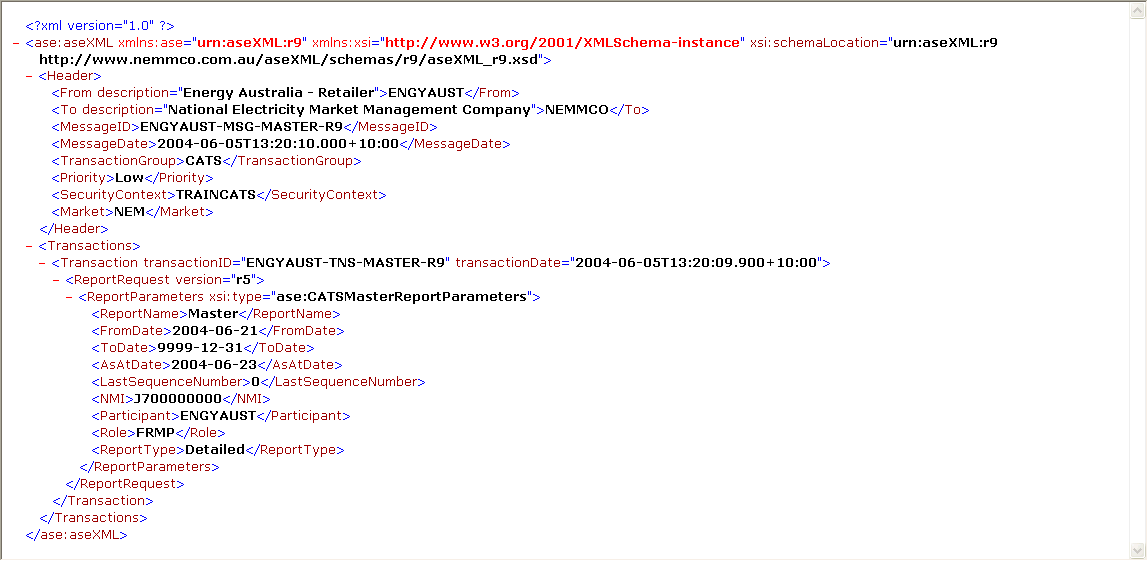
- Create an .XML file containing the report request according to the aseXML schema format. For help, see Report request example and Batch file validation.
- Each report requires a different set of parameters, see each individual report details.
- Name the file according to AEMO filename specifications, see Batch and API report requests.
- Compress the file and add the .tmp extension.
- Upload the file to your Participant Inbox in the Participant File Server (see Technical Guide to MSATS) or MSATS Web Portal (see Guide to MSATS Web Portal).
- Rename the report with the .zip extension.
- To view the response, access your Participant Outbox.
Figure 119 Report request example